Loading blog...
EasyOCR: Installation Guide, Key Features, and When to Upgrade to AI IDP

Vamshi Vadali
|
August 11, 2026
|
5 minutes read

The global OCR market reached USD 15.8 billion in 2024, with projections placing it at USD 48.1 billion by 2034 a 12.80% CAGR driven almost entirely by enterprise automation demand across BFSI, logistics, and manufacturing.
- How do you extract text from mixed-language invoices without writing extensive post-processing rules?
- Why does OCR accuracy on benchmark datasets rarely match what your team sees in production?
- What is the fastest way to test a GPU-ready OCR library in Python and when should you move beyond it?
This guide covers EasyOCR the open-source PyTorch library maintained by Jaided AI. We walk through installation, usage, best practices, and the architectural limitation that matters most for enterprise document workflows.
TL;DR
- EasyOCR is an open-source Python OCR library using deep learning installs in minutes via pip
- Supports 80+ languages and handles mixed-language text in a single image without separate model loads
- Uses CRAFT for text detection and CRNN for recognition returns text, bounding boxes, and confidence scores
- GPU support accelerates processing; CPU-only mode available for lightweight scripts
- Benchmark accuracy on controlled images does not reflect production accuracy on real enterprise document types
- Field-level extraction at volume requires significant post-processing logic on top of open-source OCR
- KlearStack extends beyond raw text extraction with document-structure understanding and 99% accuracy on production documents
What Is EasyOCR?
EasyOCR is an open-source Python library that uses deep learning to extract text from images, supporting 80+ languages and all major writing scripts Latin, Chinese, Arabic, Devanagari, and Cyrillic included.
Developed and maintained by Jaided AI, EasyOCR runs on Python using the PyTorch framework. A CUDA-capable GPU lets PyTorch’s deep learning pipeline process images significantly faster but the library runs in CPU-only mode as well, keeping it accessible without specialized hardware.
EasyOCR’s core architecture uses two neural networks in sequence. CRAFT handles text detection it locates where text appears in an image at the character level and groups characters into words and lines. CRNN handles text recognition it reads those grouped regions and outputs the recognized text alongside confidence scores and bounding box coordinates.
CRAFT and CRNN: Why the Architecture Matters
CRAFT (Character Region Awareness for Text Detection) identifies individual character regions before grouping them into structured text blocks. CRNN (Convolutional Recurrent Neural Network) then reads those blocks and returns the text with its exact position in the image.
For teams testing document extraction automation, this combination is the reason EasyOCR handles mixed-format inputs better than rule-based OCR engines the models learn from data rather than following predefined character templates.

Document AI that Eliminates Manual Processing and Compliance Gaps
How to Install EasyOCR and Extract Text in Python
EasyOCR installs in minutes on any Python 3 environment. Before you begin: install opencv-python only not opencv-contrib-python. Both packages in the same virtual environment create interference that reduces extraction accuracy.
The steps for the installation of Easy OCR are as follows:
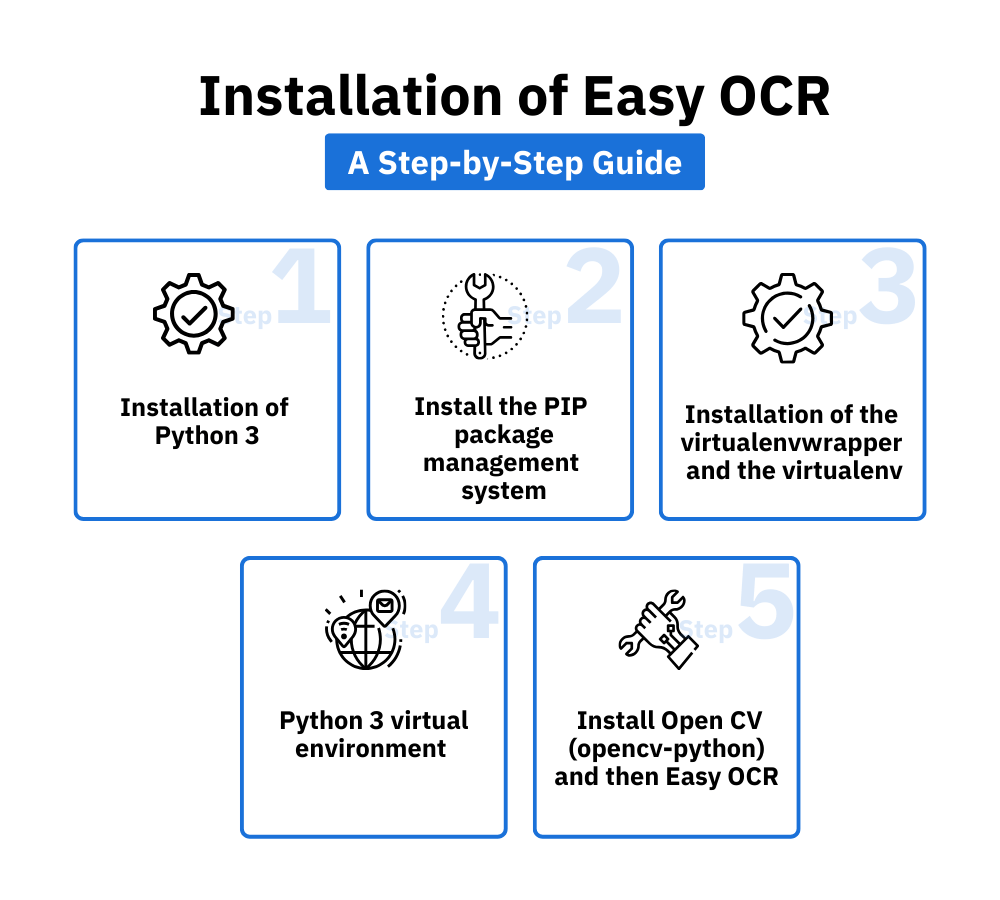
- Start with the installation of Python 3 on your device.
- Then install the PIP package management system.
- Proceed with the installation of the virtualenvwrapper and the virtualenv on your device. Edit your ZSH or Bash profile as instructed.
- Now, create a new Python 3 virtual environment and give it a name, say easy ocr. Switch it onto the active mode with the workon command.
- Lastly, install OpenCV (opencv-python) and then Easy OCR. All these steps will eventually create your virtual environment, and after this, you will be all set to get started with the optical character recognition process.

Using the Reader Class
The Reader class is EasyOCR’s primary interface. It loads language model weights into memory on initialization this takes a few seconds but only needs to run once per session. You pass your target language codes when creating the Reader object.
import easyocr
reader = easyocr.Reader([‘en’, ‘hi’])
results = reader.readtext(‘path_to_your_image.jpg’)
for (bbox, text, prob) in results:
print(text)
The output returns three values per detected region: bounding box coordinates, the recognized text string, and a confidence score. That confidence score is what makes EasyOCR practically useful in real pipelines you can filter results below a set threshold and route them to manual review. Model weights download automatically on first use, or you can place them manually in the ~/.EasyOCR/model folder.
EasyOCR Key Features: Languages, Architecture, and Output
EasyOCR’s design prioritizes versatility across languages and document types. Four core features define how it performs in practice.
Multi-Language Support
EasyOCR currently supports 80+ languages covering all major writing systems. Multiple languages can be processed from a single image when they share a compatible script group, without loading separate models. This matters for logistics companies handling import documents in mixed languages and BFSI teams processing cross-border financial instruments.
Deep Learning-Powered Recognition
The CRAFT + CRNN architecture lets EasyOCR adapt to varied fonts, text orientations, and non-standard layouts capabilities that rule-based OCR engines require manual configuration to handle. CRAFT detects where text exists at the character level. CRNN reads those regions and returns structured output.
Coordinate and Confidence Output
EasyOCR returns the exact bounding box coordinates of every detected text region alongside a confidence score. This structured output enables downstream document processing pipelines where field position matters as much as text content essential for any extraction workflow that maps text to specific fields.
CPU and GPU Support
EasyOCR defaults to GPU when a CUDA-capable card is available. CPU mode activates with a single parameter: gpu=False. Both modes run the same model GPU simply accelerates inference, making it the preferred configuration for high-volume batch processing.
Document AI that Eliminates Manual Processing and Compliance Gaps
Where EasyOCR’s Accuracy Falls Short in Enterprise Document Workflows
EasyOCR performs well on benchmark image datasets. In real enterprise environments, the gap between test accuracy and production output is where most teams get caught and the reason is architectural, not incidental.
EasyOCR reads text – it does not understand document structure. It cannot distinguish an invoice number from a line item amount, or a vendor name from a postal code, unless you write that logic yourself.
The accuracy figures commonly cited for EasyOCR are measured on clean, controlled image datasets: well-lit, high-resolution, standard font types. Real business documents are different. Scanned invoices arrive with varying resolution, rotation, background noise, and inconsistent fonts.
Multi-column purchase orders, handwritten annotations on shipping forms, and dense numeric tables in bank statements all push extraction accuracy below benchmark levels in production. CRAFT locates where characters are. CRNN reads them. Neither model knows that the number after “Invoice No.” is an identifier, not an amount or that the same field appears in a different position across vendors.
For development teams building lightweight prototypes, adding that post-processing logic is manageable. For operations teams handling 10,000 or 50,000 documents monthly, building and maintaining a validation layer for every document type becomes the real workload.
Every new vendor or form variation adds new rules. Every rule creates new exception cases. This is the inflection point where open-source OCR shifts from a cost-saving tool to a maintenance liability. Most accounts payable and compliance teams reach it faster than expected.

Best Practices to Get the Most Out of EasyOCR
Input quality, language configuration, and preprocessing directly control how close production accuracy gets to benchmark figures.
1. Input image quality. Ensure images are clear, well-lit, and high-resolution. EasyOCR’s deep learning models tolerate more variation than traditional OCR but image quality still sets the ceiling. A 300 DPI scan outperforms a photo taken under poor lighting every time.
2. Language and script selection. Specify only the language codes you actually need. Using the wrong language model reduces accuracy on otherwise clean documents. Loading fewer languages also reduces memory usage and cuts initialization time.
3. Preprocessing. Apply noise reduction, contrast adjustment, and image normalization before running EasyOCR. Preprocessing is the single most reliable way to improve extraction accuracy correct it at the image level rather than expecting the model to compensate.
4. Batch processing. For document volumes above a few hundred files, use EasyOCR’s batch processing mode to handle multiple images simultaneously. This is the right approach for any production pipeline with consistent document inflows.
5. Fine-tuning. EasyOCR supports fine-tuning on domain-specific datasets. For BFSI and logistics document types invoices, bills of lading, NACH mandates fine-tuning on your actual document library is what moves accuracy from acceptable to reliable in production.
EasyOCR Use Cases in Business Document Processing
EasyOCR covers several document automation scenarios where text extraction is the primary goal.
Invoice processing. EasyOCR automates the extraction of vendor details, invoice amounts, and due dates as part of invoice data extraction pipelines. It is a practical starting point for AP teams testing automation before committing to a full IDP platform.
Receipt recognition and expense management. EasyOCR pulls data from receipts for expense reporting automation. Accuracy is typically highest here receipts tend to be printed with consistent layouts and clear fonts.
Document digitization for compliance. Businesses converting physical records to digital formats for regulatory compliance use EasyOCR to make documents searchable across BFSI and legal use cases.
Automated data entry. EasyOCR reduces manual keying errors for back-office teams handling repetitive forms by automating data entry tasks at the text extraction layer.
HR document processing. HR departments digitize employee records, forms, and ID documents to improve retrieval speed and reduce manual file management overhead.
EasyOCR vs. Tesseract: Which One to Use for Enterprise Document Processing
Both EasyOCR and Tesseract are widely used open-source OCR engines. The right choice depends on your document complexity and team capability.
EasyOCR uses a deep learning pipeline (CRAFT + CRNN) that adapts to varied fonts, languages, and layouts without manual configuration. Tesseract uses a traditional OCR engine refined over decades it performs reliably on clean, high-quality documents but requires more setup for non-standard inputs.

| Feature | EasyOCR | Tesseract OCR |
| Accuracy (benchmark) | ~95% (deep learning) | ~90% (traditional OCR) |
| Ease of use | Beginner-friendly API | Requires more configuration |
| Architecture | CRAFT + CRNN (deep learning) | Traditional rule-based OCR |
| Language support | 80+ languages | Wide with language packs |
| Output format | Text + bbox coords + confidence | Text output primarily |
| GPU support | Yes – CUDA, CPU fallback | Limited |
| Document structure | No – text extraction only | No – text extraction only |
For teams evaluating document extraction for production workloads, neither open-source tool alone resolves the structural understanding gap both require post-processing logic to achieve field-level extraction accuracy at scale.
When Open-Source OCR Isn’t Enough: How KlearStack Handles What EasyOCR Can’t
EasyOCR is a capable starting point for document automation. The limitations appear when document volume, field-level accuracy requirements, and integration needs increase beyond what an open-source library’s architecture was designed to handle.
KlearStack processes documents using a self-learning AI model that understands document structure not just character positions. It knows that the number after “Invoice No.” is an identifier, that vendor name format varies across suppliers, and that a purchase order from a new vendor does not require a new template.
Key capabilities that go beyond open-source OCR:
- Template-free processing that adapts to any document layout without configuration or manual rules
- Self-learning algorithms that improve field extraction accuracy over time on your specific document types
- 99% extraction accuracy across BFSI, logistics, and manufacturing documents on real production volumes, not benchmark datasets
- Direct integration with SAP, QuickBooks, and RESTful APIs for ERP data flow without custom middleware
- ISO 27001 and SOC 2 compliance for financial and banking data security requirements
- Straight-through processing rates above 95% post-launch across document-heavy workflows
Teams at Arcelor Mittal, Konica Minolta, and Landmark Group run enterprise-scale document automation on KlearStack today. Most AP managers who contact us have already tested open-source OCR. They know exactly what 70% field accuracy looks like across 50,000 monthly documents. We run your actual files not a benchmark dataset so you see real production accuracy before any commercial commitment.
See 99% accuracy on your own documents – no templates, no rules engine required → klearstack.com/demo-form
Conclusion
EasyOCR is a capable open-source foundation for text extraction in Python. It installs quickly, supports 80+ languages, and returns structured output with bounding boxes and confidence scores enough to prototype document automation in a day.
The production limitation is structural, not incidental: EasyOCR extracts text without understanding document context. Field-level accuracy at enterprise volume requires either significant post-processing investment or a platform built for document intelligence from the start.
FAQs
What is Easy OCR used for?
EasyOCR is used for optical character recognition extracting text from images and scanned documents. Finance and operations teams use it for invoice processing, automated data entry, and document digitization. It supports 80+ languages and returns text with bounding box coordinates and confidence scores.
Which is better, Tesseract or Easy OCR?
EasyOCR performs better on varied inputs, mixed languages, and complex layouts due to its deep learning architecture using CRAFT and CRNN. Tesseract is reliable for clean, high-quality documents and is well-suited to standard digitization tasks. Your document type and available technical resources determine the right choice.
Is Easy OCR free?
Yes, Easy OCR is open-source and free under the Apache 2.0 license. Source code is available on GitHub and can be used commercially within the license terms. Check the specific licensing terms for your deployment scenario.
What is Easy OCR’s architecture?
EasyOCR uses CRAFT for text detection and CRNN for text recognition. CRAFT locates character regions in an image at the character level. CRNN reads those regions and outputs text with confidence scores. This deep learning architecture handles varied fonts and languages without manual rule configuration.
Vamshi Vadali
Vadali Vamshi is a technology writer specializing in AI-powered document processing, intelligent automation, and OCR solutions. He helps businesses simplify complex document workflows through clear, insightful, and actionable content. Passionate about emerging trends in Document AI, Vadali writes extensively on how intelligent document processing accelerates efficiency and compliance across industries.